

The Best Google Search Tips for Translators

All translators know that research is one of the key parts of the translation process, but not everyone knows that there are some simple ways of making your Google searches more effective. Below is a list of some Google search tips and strategies that are particularly useful for translators. If you didn鈥檛 already know about them, try them out! You should find that they make your searches more efficient and that you get better results.
Find an Exact Phrase
Most people will probably already know about and use this Google search strategy. However, it is one of the most useful, so it is still worthy of a mention. To search for an exact phrase, put听quotes听around the phrase.
Example: 鈥渟tay engaged in鈥�
This will only give you results that include that phrase in that order. Without the quotes, you get some results related to getting engaged. This strategy can be helpful, for example, when researching specific terms or when checking whether a phrase sounds natural. You can also combine multiple exact phrases.
Example: 鈥渆lderly people鈥� 鈥渟tay engaged in鈥�
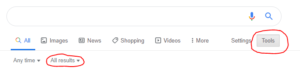
Occasionally, just using quotes will not be enough to make Google search exactly what you are looking for. This is because Google changes your search to find what it thinks you鈥檙e looking for. This involves dropping certain words, correcting spellings, including synonyms or dropping apostrophes. If you want to ensure that Google only searches exactly what you input, do a听verbatim听search. To do this, go to听Tools,听then click听All Results听and then听Verbatim.
Search results can also be influenced by factors like your location, device and search history. To minimise this influence, go to听Settings听and click听Hide private results听(you can also set this to the default in听Search settings). Better still, use an听anonymous browser, such as Chrome鈥檚 Incognito mode or Edge鈥檚 InPrivate browsing. However, be aware that even when using these methods, Google may still personalise results to some extent due to cookies鈥攖here are ways to get around this if it鈥檚 a problem for you.
Find a Missing Word
To find a missing word or words in a phrase, use an听asterisk听to carry out a听wildcard听search. This is particularly beneficial to translators when you are unsure of common collocations or set phrases.
Example: 鈥渢o * a coup鈥�
This search shows that some common collocations with coup are: to lead a coup, to stage a coup, to attempt a coup.
Define a Word
To get the definition of a word you simply type听define:听followed by the term you want to define. This can help you to ascertain whether you are using a word correctly. You can also use this to find synonyms and related words.
Example: define:tortuous
This shortcut also works in other languages if you enter 鈥渄efine鈥� in that language.
Example in Spanish: definir:pluralidad
Remove Results that Contain a Specified Term
Sometimes you may want to exclude results related to a specific term, use the听minus sign听to do this. This can be of use to translators when you have a term with multiple meanings that you want to look up and you want to exclude results related to one of those meanings.
Example: matrix -film
This will give you results related to the word 鈥渕atrix鈥�, excluding any results that also include the word 鈥渇ilm鈥�.
Search Within a Website
You can use听site:听followed by a website address and then your search term to search for that term within that website. This can be especially helpful for translators if you are not provided with a glossary but the client has a multilingual website. In this way, you can search for the term in the source-language website and then switch to the version in your target language to see how the term is translated.
Example: site:repsol.com/es 鈥渆xploraci贸n y producci贸n鈥�
This search shows us the pages where the phrase 鈥渆xploraci贸n y producci贸n鈥� is found on the Spanish website and its breadcrumb. When we switch to the English version of the website, we are taken back to the homepage, but we can use the breadcrumb to find the same page. We find that the English term used by Repsol for this is 鈥渦pstream鈥�.
View the Cached Version of a Website
When you google something, you sometimes find that when you click on a search result, you cannot actually find your search term on that page. This is often because the page has been updated since Google last cached the page. You can view Google鈥檚 most recent cache of a page by typing听cache:听followed by the website address (there is no need to include http:// or www.). You can usually then find your search term on the cached page. This can also help if a site is down for maintenance.
Example: cache:iti.org.uk
Find Out the Time in Another Time Zone
Translators often work with clients in different time zones, this can sometimes make deadlines confusing. A simple way of checking the time in another time zone is to type the time and time zone followed by听in听or听to听and the time zone you want to convert it to. You can also search听time in听followed by a city or country to show the current time in that place.
Example: 9am EST in GMT
Or: time in New York
Convert Units
Depending on the requirements of the client and style guide, you may need to convert units when translating. You can do this in Google by simply typing in what you want to convert followed by听in听or听to听and the unit you want to convert it to.
Example: 127 GBP to EUR
Or: 26 miles in km
Search a Range of Numbers
If you want to search for a range of numbers, use听two dots. Translators may want to use this when researching events between certain dates. You can also use it when you are unsure of the exact date that something occurred.
Example: canal built Belgium 1800..1825
Search in Websites with a Particular Domain Suffix
You can search in websites that only have a certain domain suffix by using the听site:听function followed by the domain suffix and then your search term. Translators may wish to use this function to check if a certain word or phrase is used in a specific country. It can also be helpful when researching terms that have different meanings in different countries.
Example: site:.co.uk 鈥渟hoot the breeze鈥�
Filter Results by Date
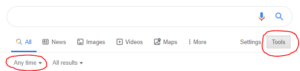
If you want to filter your results by when they were published, you can do this by clicking on听Tools听and then choosing a time frame or setting a custom range. This can be of use to translators who work in fast-moving fields, such as IT, and therefore need the latest information.
You can also set a date range using the before: and after: commands.
Example: film release after:2020-01-01 before:2020-01-09
Compare Usage of Different Words or Phrases
You can use the quotes search strategy explained at the start of this list to compare the results for similar phrases to determine which is more commonly used. For example, if you are unsure whether the more commonly used collocation is 鈥渟tay engaged in鈥� or 鈥渞emain engaged in鈥�, you can search both and compare the number of results given for each one.
Example: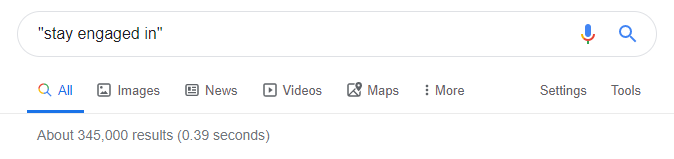
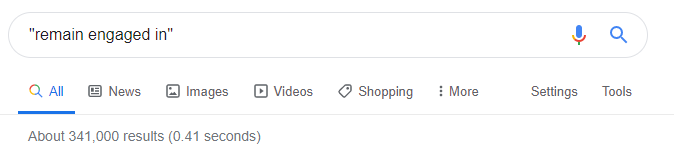
In this case, the number of results is relatively high and similar for both terms, which suggests that both terms are acceptable. You could narrow it down further to see which is used more frequently in a specific context. You could do this by adding further search terms outside the quotes, searching within a specific site, excluding results that contain a certain word or searching within sites with a particular domain suffix.
Another way of comparing usage of a certain word or phrase is by using听, which is a search engine that charts the frequency of words in the Google Books corpora. You can use Google Ngram Viewer to compare the frequency of different terms, compare the frequency of the same term in different corpora, such as the British English corpus and the American English corpus, or see the frequency of terms within a specific time frame. Also, unlike standard Google searches, Google Ngram Viewer is case sensitive, so it can prove useful in situations where you are unsure whether to capitalise a certain word.
Example:
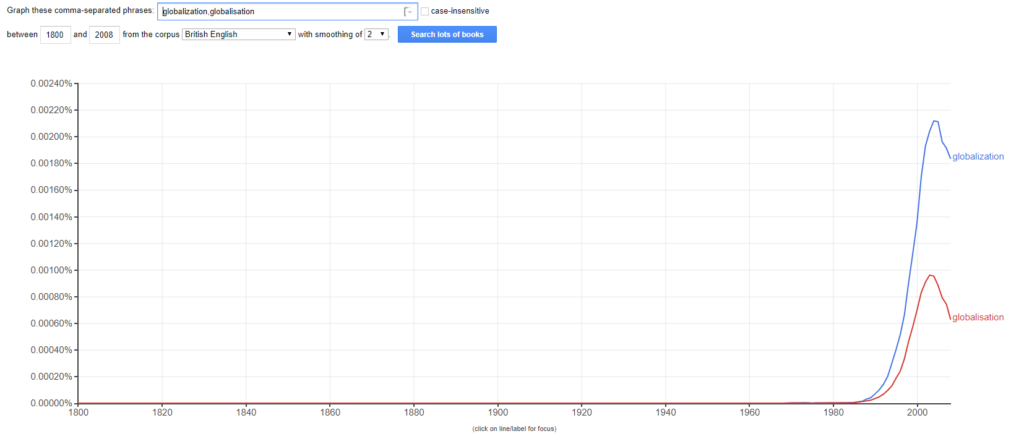
Google Ngram Viewer has many other interesting uses, which you can read more about听.
Ensure Reliability of the Source
One way to ensure the reliability of sources is to use听, which only returns results from credible, scholarly literature. Google Scholar is particularly handy for translators who specialise in more academic fields, such as law or medicine.
Finally, don鈥檛 forget that you can combine the different tips that I have listed above to narrow your results down further.
I hope you find these Google search tips for translators helpful. There are many other search tips and strategies out there, but I selected the ones that I find most beneficial as a translator. Let me know if you have any other search tips that you think other translators may benefit from!
If you鈥檙e looking for more technology tips for translators, have a look at my posts on听听and听.
About the Article
This post was originally published on听. It is reposted with permission.
About the Author
 Katie L Ward is a freelance translator and subtitler based in Shropshire, England. With an MA in Translation Studies and over five years of experience, she specialises in creating English subtitles for audiovisual content in French and Spanish. When Katie鈥檚 not at her desk, she likes to travel with her partner, spend time with their two mischievous cats, and pursue creative hobbies.
Excellent!
This is very insightful. Thank you very much! It will really help me as a translator.
Great article. I was aware of most of the tips, but still learned a few tricks!
Thank you, Katie for sharing these useful tips!
It was very helpful. Thank you!